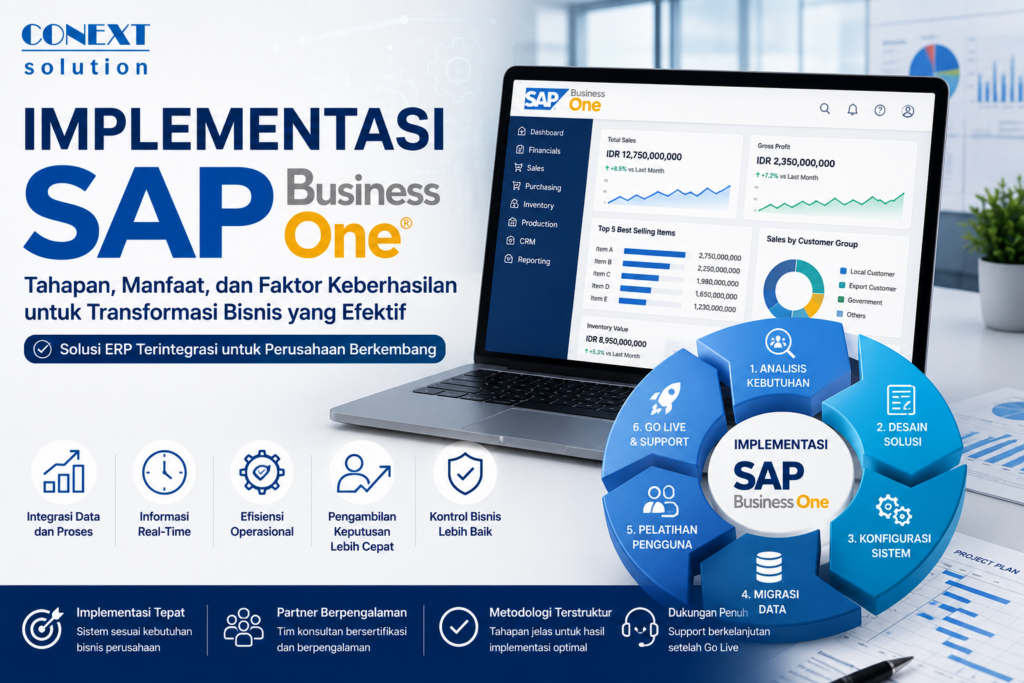
What Is SAP Business One Implementation?
SAP Business One implementation is the process of integrating the SAP Business One ERP system into a company’s operations to consolidate various business processes—such as finance, sales, purchasing, inventory, production, and reporting—into a single platform.
SAP Business One implementation is more than just installing software. This process also includes business needs analysis, system configuration, data migration, user training, and post-go-live support.
For this reason, many companies choose to partner with experienced SAP Business One implementation consultants to ensure the project stays on track.
Why Is SAP Business One Implementation Important?
Many companies face issues such as:
- Data scattered across various systems
- Difficulty generating real-time reports
- Inaccurate inventory
- Time-consuming manual processes
- Lack of business visibility
Through the implementation of SAP Business One, all business data can be integrated into a single system, thereby improving operational efficiency and the accuracy of information.
Benefits of Implementing SAP Business One
1. Cross-Departmental Data Integration
All departments use the same database, eliminating data duplication.
2. Real-Time Reporting
Management can view the business situation in real time through dashboards and reports that are constantly updated.
3. Operational Efficiency
Automating business processes helps reduce manual work and boost productivity.
4. Faster Decision-Making
Accurate data helps management make more informed decisions.
5. Supporting Business Growth
SAP Business One can scale to meet the company’s needs.
SAP Business One Implementation Phases
Business Needs Analysis
The first stage of SAP Business One implementation is understanding the company’s business processes.
The implementation team will perform:
- Business process mapping
- Gap analysis
- Requirement gathering
The goal is to ensure that the system built truly meets the company’s needs.
SEE ALSO: Odoo Manufacturing: An ERP Solution for More Efficient Production Management
Solution Design
Once the business needs are understood, the team will design a solution that includes:
- Organizational structure
- Workflow
- User Access Rights
- Dashboard
- Reports
SAP Business One Configuration
At this stage, the system begins to be configured according to the company’s needs.
For example:
- Set up the chart of accounts
- Set up the warehouse
- Set up approval workflow
- Tax setup
Data migration
Old data is transferred to the new system.
Data typically migrated:
- Customer master data
- Vendor Master
- Product data
- Opening balances
- Transactions
User Acceptance Test (UAT)
Before the system is officially put into use, users conduct system testing.
The goal is to ensure that all functions operate in accordance with business needs.
User Training
Training is one of the key factors in the implementation of SAP Business One.
Users must understand:
- How to use the system
- New operational procedures
- Reporting
- Best practices for using ERP
Go-Live
Once the entire process is complete, the system is officially put into use.
This stage is often referred to as “go-live.”
Support and Continuous Improvement
After go-live, the company still requires technical support and system optimization.
Factors for Successful SAP Business One Implementation
Management Support
The success of an SAP Business One implementation is heavily influenced by management’s commitment.
An Active Internal Team
The company needs to appoint key users from each department.
Experienced Implementation Partner
Choosing the right partner can reduce the risk of project failure.
Clean Data
Data quality is critical to the success of an ERP implementation.
Adequate Training
Trained users will adapt to the new system more quickly.
How Long Does SAP Business One Implementation Take?
The duration of an SAP Business One implementation varies by company.
Generally:
| Company Size | Duration |
|---|---|
| Small | 1–3 Months |
| Medium | 3–6 months |
| Long | 6–12 Months |
The duration depends on the complexity of the business processes and the number of modules used.
SEE ALSO: SAP Business One: An Integrated ERP Solution for Growing Companies
Challenges in Implementing SAP Business One
Some common challenges:
- User Resistance
- Inconsistent data
- Changing business needs
- Lack of training
- Overly aggressive timelines
With proper planning, these challenges can be minimized.
Implementing SAP Business One is a strategic move for companies seeking to improve operational efficiency and accelerate digital transformation.
Through the right steps, management support, and an experienced implementation partner, companies can maximize the benefits of the SAP Business One ERP system.
For companies considering an ERP implementation, SAP Business One is a solution worth considering due to its flexibility and ability to support business growth.
FAQ
What is SAP Business One implementation?
SAP Business One implementation is the process of deploying the SAP Business One ERP system to integrate all of a company’s business processes.
How long does a SAP Business One implementation take?
Generally between 1 and 12 months, depending on the complexity of the business and the number of modules.
Is SAP Business One suitable for medium-sized companies?
Yes, SAP Business One is specifically designed for small to medium-sized growing companies.
What are the benefits of implementing SAP Business One?
The benefits include data integration, real-time reporting, operational efficiency, and faster decision-making.
Why is an SAP Business One implementation consultant necessary?
A consultant helps ensure the implementation aligns with business needs and minimizes the risk of project failure.